








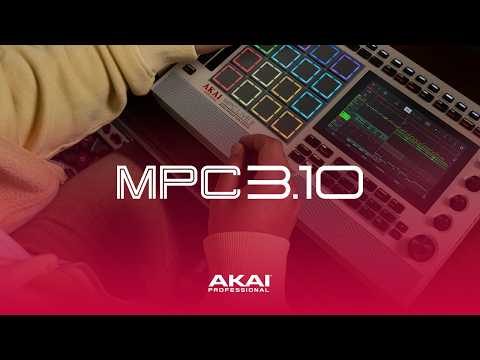
Akai has released MPC 3.10, a major update for the MPC ecosystem that brings MPC 3 Desktop officially out of beta while also updating compatible MPC standalone hardware.
Released on October 22, 2026, MPC 3.10 is not a complete redesign of the MPC workflow. Instead, it is an important consolidation update: Desktop and Standalone now move forward together on the same generation, Arrange receives useful editing improvements, Pro Tools users finally get AAX support, new MPK controllers gain deeper integration, and Akai has fixed a long list of stability, MIDI, recording, plugin and project-management issues.
If you use an MPC as the center of your beatmaking workflow, this is one of those updates where the small details matter almost as much as the headline features.
The Short Answer
MPC 3.10 is the current MPC update for both Desktop and compatible Standalone hardware.
The biggest changes are:
- MPC 3 Desktop is officially out of beta.
- Desktop and compatible MPC hardware now use the 3.10 generation together.
- Arrange Mode gets new Marquee, Track and Arrangement selection tools.
- MPC Desktop adds native AAX support for Pro Tools.
- MPC Beats becomes a free tier inside the same MPC 3 application.
- MPK Mini IV and MPK Mini Plus II receive dedicated MPC integration.
- MPC Live III and MPC XL get expanded 8×8 MPCe pad modes.
- Loop editing, plugin browsing, expansion detection and navigation have been refined.
- Akai has fixed a large number of crashes, MIDI problems, recording issues, plugin bugs and project-loading problems.
For most MPC 3 users, I would consider 3.10 a worthwhile update — but back up important projects first and make sure your Desktop and Standalone versions match if you use controller mode.
MPC 3.10 at a Glance
| Area | MPC 3.10 Change |
|---|---|
| MPC Desktop | Officially exits beta |
| Standalone | New 3.10 firmware for compatible MPC hardware |
| Arrange Mode | New Marquee, Track and Arrangement selection modes |
| DAW integration | AAX support added for Pro Tools on macOS and Windows |
| MPC Beats | New free tier using the same MPC 3 application |
| Controllers | Dedicated MPK Mini IV and MPK Mini Plus II integration |
| MPCe pads | 8×8 Notes and Clip Launch modes on MPC Live III and MPC XL |
| Workflow | Improved loop editing, plugin browsing, expansion detection and Arrange navigation |
| Stability | Large set of fixes across MIDI, recording, plugins, saving/loading and editing |
The Biggest Change: MPC 3 Desktop Is Officially Out of Beta
This is the most important part of MPC 3.10.
MPC 3 Desktop is now an official release.
That matters because MPC 3 introduced a fundamentally different workflow from MPC 2: a more modern Main Mode, one-to-one track structure, linear arrangement, improved mixer views, deeper automation and a workflow that feels much closer to the current standalone operating system.
Until now, desktop users were still working around the fact that MPC 3 Desktop was a beta product.
MPC 3.10 changes that.
Akai now presents MPC 3 Desktop as the current desktop version of the platform, with updated manuals, hardware compatibility and direct integration with the current standalone firmware.
If you have been waiting for MPC 3 Desktop to leave beta before moving serious projects over, 3.10 is the version that makes that transition much easier to justify.
Desktop and Standalone Now Need to Match
This is one of the most important practical details in the update.
If you want to use compatible MPC hardware with MPC 3.10 Desktop, Akai states that your MPC hardware also needs to be running MPC 3.10 firmware.
If your standalone MPC is still running an earlier MPC 3 build, MPC 3.10 Desktop may not recognize it correctly in controller mode until the firmware is updated.
The exception mentioned by Akai is MPC Studio MKII, which is a controller rather than a standalone MPC.
So if your workflow regularly moves between:
- Standalone
- Controller Mode
- MPC Desktop
keep both sides on the same current version.
Enhanced Arrange Mode
Arrange Mode is one of the areas that receives the most useful workflow improvements in MPC 3.10.
Akai has added new selection modes for:
- Marquee
- Track
- Arrangement
The practical goal is simple: make it easier to select and edit the exact level of the arrangement you want.
Instead of treating every edit as the same type of operation, you can work more naturally with individual regions, full tracks or larger sections of a song.
For producers who build complete arrangements inside MPC rather than exporting loops immediately to another DAW, this is one of the most important quality-of-life improvements in the update.
Why This Matters for Beatmakers
For sample-based production, the hardest part is often not making the first eight bars.
It is turning those eight bars into a complete record.
A typical boom bap project might contain:
- intro chops;
- main sample variation;
- drum changes;
- bass drops;
- mute sections;
- alternate sequences;
- outro variation.
Anything that makes moving, duplicating and restructuring those sections faster makes MPC more useful as a complete production environment.
MPC 3.10 continues pushing the platform in that direction.
AAX Support Comes to MPC 3 Desktop
MPC 3.10 Desktop now supports AAX on macOS and Windows.
That means MPC 3 can now be loaded directly inside Avid Pro Tools using the native plugin format expected by Pro Tools.
MPC 3 Desktop already supports other plugin formats, but AAX removes an important limitation for producers and engineers who use Pro Tools as their main recording or mixing environment.
This is particularly useful if you prefer to build drums, chops and MPC programs inside MPC, then continue recording or mixing inside Pro Tools without changing the core MPC workflow.
MPC 3 Beats: A New Free Entry Point
MPC 3.10 also introduces a new MPC Beats mode.
This is not simply the old MPC Beats application with a new icon.
Akai now uses the same MPC 3 application for both the free and full versions. The feature set is determined by activation.
That is a much cleaner system.
A new producer can start with the free tier, learn the current MPC 3 workflow and later move to the full version without having to learn a completely separate application.
According to Akai, MPC 3 Beats is available free through the inMusic Software Center.
MPC 3 Desktop: Who Gets It?
Akai says users with qualifying registered MPC hardware can claim MPC 3 Desktop through the inMusic Software Center.
Existing MPC 2 owners can also receive MPC 3 Desktop as a free update, including users who originally purchased MPC 2 without MPC hardware.
MPC 3 Desktop uses its own licensing system with up to three computer activations and does not use the old iLok workflow associated with MPC 2.
MPC 2 and MPC 3 Desktop can also remain installed as separate applications on the same computer.
That is useful if you still have older projects that you do not want to migrate immediately.
Compatible Hardware for MPC 3 Desktop
Akai currently lists the following hardware as compatible with MPC 3 Desktop:
- MPC Key 37 G2
- MPC One G2
- MPC XL
- MPC Live III
- MPC Key 37
- MPC One+
- MPC X Special Edition
- MPC Key 61
- MPC One
- MPC Live II
- MPC X
- MPC Live
- MPC Studio MKII
The exact standalone capabilities still depend on the hardware generation, CPU, RAM and I/O of each model.
MPK Mini IV and MPK Mini Plus II Integration
MPC 3.10 adds dedicated integration for the Akai MPK Mini IV and MPK Mini Plus II.
The support applies across MPC Standalone and MPC Desktop.
This is more useful than generic MIDI mapping because Akai can provide deeper control over transport, navigation and MPC-specific functions.
For producers who like the MPC workflow but also want keys and physical knobs in front of them, this makes the new MPK generation much more relevant.
MPC Live III and MPC XL: Expanded 8×8 MPCe Pad Modes
This feature is specific to the newer MPC hardware with MPCe pads.
MPC Live III and MPC XL now support expanded 8×8 Notes and Clip Launch modes.
That gives access to 64 positions for performance and clip triggering.
This does not suddenly turn older 16-pad MPC models into 64-pad controllers. It is an expansion of the newer MPCe workflow available on the hardware designed for it.
Workflow Improvements Beyond the Headline Features
MPC 3.10 includes several smaller improvements that may have more impact during everyday production than the marketing headline suggests.
Akai highlights improvements to:
- loop editing;
- plugin browsing;
- CV port visibility;
- expansion detection;
- Arrange Mode navigation.
Expansion detection is especially relevant for producers who use large MPC libraries.
When your system contains multiple expansions, custom programs and large sample libraries, browser reliability becomes part of the creative workflow rather than a minor technical detail.
If you want a deeper explanation of how MPC expansions work, read What Is an MPC Expansion and How Does It Work?.
The Bug Fix List Is Huge
MPC 3.10 also contains a long list of bug fixes across both hardware and desktop workflows.
The major areas include:
- overall stability;
- playback and recording;
- MIDI routing;
- MIDI synchronization;
- controller behavior;
- project saving and loading;
- audio recording;
- sample editing;
- Arrange Mode;
- Track Edit;
- Step Sequencer;
- plugin compatibility;
- MPC Studio MKII;
- Force.
There are also desktop-specific fixes for VST3 and AU plugin windows, Kontakt tempo synchronization, automation, Track Mixer behavior and crashes.
That is why I would not look at 3.10 only as a feature update.
It is also a cleanup release for the broader MPC 3 platform.
MIDI and Controller Fixes
MIDI receives a substantial number of corrections.
Akai has addressed issues involving:
- MIDI input routing;
- Note Repeat and input channels;
- stuck notes on non-channel-1 MIDI data;
- program changes;
- reconnecting MIDI devices on Windows;
- controller integration.
If you use external synths, keyboards or controllers with MPC, these fixes may be more valuable than any visible interface change.
Plugin Compatibility Improvements
Akai also reports improved plugin compatibility across Desktop.
Fixes include problems involving:
- VST3 interfaces;
- AU plugins;
- AIR plugin editors;
- Kontakt instruments using tempo-based loops.
Combined with the new AAX support, MPC 3.10 makes the Desktop version much easier to treat as part of a larger DAW setup rather than as an isolated MPC application.
Standalone Is Still Standalone
One point is worth making clear.
MPC 3.10 does not turn standalone MPC hardware into a general VST host.
Third-party desktop VST plugins still run on your computer, not natively inside standalone MPC hardware.
Standalone continues to use the instruments and effects built specifically for the MPC environment.
The advantage of MPC 3.10 is that the transition between hardware and computer is becoming more coherent.
Project Compatibility: Back Up Before Updating
This is the section I would not ignore.
Akai has previously warned that MPC 3 projects are not necessarily directly compatible with MPC 2 Desktop because of the architectural changes introduced in MPC 3.
The biggest change is the move toward a unified track structure rather than the older MPC 2 relationship between tracks and programs.
If you still rely on MPC 2:
- back up important projects;
- save a separate copy before opening legacy projects in MPC 3;
- do not overwrite your only working version;
- keep MPC 2 installed if you still need it.
Akai confirms that MPC 2 and MPC 3 Desktop can coexist as separate applications.
Before You Install MPC 3.10
I would do four things first.
1. Back Up Your Projects
Especially projects created in older MPC versions.
2. Back Up Custom Content
That includes:
- samples;
- custom drum programs;
- keygroups;
- expansions;
- templates;
- user presets.
3. Check Your Computer Drivers
If you use MPC hardware with Desktop, Akai recommends installing the latest hardware drivers through the inMusic Software Center.
4. Update Desktop and Hardware Together
If controller mode is part of your workflow, keep both sides at 3.10.
How to Update MPC Standalone to 3.10
Akai supports several firmware update methods.
Depending on your hardware, you can update using:
- Wi-Fi or Ethernet where supported;
- USB drive;
- a Windows or Mac computer.
The safest approach is to follow the current official Akai firmware update guide for your hardware.
How to Update MPC 3 Desktop
For Desktop, Akai directs users to the inMusic Software Center.
- Close MPC 3.
- Open the inMusic Software Center.
- Go to My Software.
- Find MPC 3.
- Select Update.
- Install the current 3.10 build.
If your Arrange view is not behaving as expected on Desktop, Akai specifically recommends checking that you are actually running 3.10 rather than an older beta build.
MPC 3.10 Desktop System Requirements
Akai currently lists the following minimum requirements.
Windows
- Windows 10 21H2 through Windows 11 26H2
- 4 GB RAM minimum
- 8 GB RAM recommended
- Dual-core 2.5 GHz CPU
- 2 GB free disk space
- 20 GB recommended for all content
- Internet connection
macOS
- macOS 15 through macOS 27
- Intel and Apple Silicon support, subject to model driver compatibility
- 4 GB RAM minimum
- 8 GB RAM recommended
- Dual-core 2.5 GHz CPU
- 2 GB free disk space
- 20 GB recommended for all content
- Internet connection
What About Force?
Force also receives 3.10-related improvements.
Akai has added:
- 16 Levels Scale support;
- Arp Latch feedback;
- improved Pad Mode configuration shortcuts;
- additional bug fixes and workflow refinements.
Force remains its own standalone workflow, but Akai has clearly not abandoned it in this release.
Is MPC 3.10 a Major Update?
It depends on how you define major.
If you are looking only for a completely new sampler, synth engine or headline creative effect, 3.10 may initially look modest.
But from a platform perspective, it is important.
MPC 3 Desktop leaving beta means the MPC 3 architecture is now officially established on both sides of the workflow.
That makes 3.10 less about one spectacular feature and more about the MPC ecosystem becoming coherent.
For me, that is the real story.
Who Benefits Most From MPC 3.10?
Desktop Users
You get the biggest change because MPC 3 Desktop is now officially released rather than beta software.
Pro Tools Users
AAX support finally makes MPC 3 a proper native option inside Pro Tools.
Hybrid Standalone/Desktop Users
Matching 3.10 firmware and software makes controller mode and project workflows more consistent.
Live III and MPC XL Users
The expanded MPCe pad modes give those newer machines another performance advantage.
MPK Mini IV / Plus II Users
You now get deeper dedicated MPC integration.
Producers With Large Expansion Libraries
Improvements to expansion detection and browsing should make everyday navigation smoother.
Should You Update to MPC 3.10?
For most MPC 3 users: yes.
I would update if:
- you already use MPC 3 regularly;
- you want the official MPC 3 Desktop release;
- you use Desktop and Standalone together;
- you work heavily in Arrange Mode;
- you use Pro Tools;
- you have experienced MIDI, plugin or stability issues addressed by 3.10.
I would wait briefly if:
- you are in the middle of an important client project;
- your current system is completely stable and you cannot afford downtime;
- you rely on an older computer or driver configuration that has not yet been tested;
- you still depend heavily on MPC 2 project compatibility.
The normal rule applies:
Never make a major software change in the middle of a critical session without a backup.
My Take on MPC 3.10
MPC 3.10 feels like Akai finishing a transition that started when MPC 3 first arrived.
Standalone has already changed significantly over the MPC 3 generation.
Now Desktop is finally becoming a first-class part of the same system.
For producers like me who build around samples, drum programs, standalone projects and custom MPC expansions, that consistency matters.
I do not need every update to add ten new instruments.
I need the browser to find the expansion.
I need the project to load.
I need controller mode to connect.
I need Arrange to be faster.
I need MIDI and plugins to behave predictably.
MPC 3.10 is largely about those things.
And that makes it a more important update than the version number might suggest.
Keep Learning
If you are new to the MPC ecosystem and want to understand how expansion files, programs and standalone content work, read What Is an MPC Expansion and How Does It Work?.
If you are deciding between MPC and a more resampling-focused workflow, read MPC vs SP-404MKII for Boom Bap: Which Is Better?.
Explore Soul Chemist MPC Expansions
MPC updates keep making the platform deeper, but the fastest way to start creating is still having sounds organized for the machine before the session begins.
Explore Soul Chemist MPC Expansions for ready-to-load kits, programs, samples and standalone workflows built for gritty sample-based production.
LOAD. PLAY. CREATE.


Share:
How to Tune Drum Samples to Your Beat